mirror of
https://github.com/TheBinaryNinja/tvapp2.git
synced 2026-06-04 03:35:42 -04:00


1019 lines
36 KiB
Markdown
1019 lines
36 KiB
Markdown
<div align="center">
|
|
<h6>A self-hosted docker container which allows you to retrieve M3U playlists and EPG guide data from numerous online IPTV services.</h6>
|
|
<h1>♾️ TVApp2 ♾️</h1>
|
|
</div>
|
|
|
|
<br />
|
|
|
|
<div align="center">
|
|
|
|
<!-- prettier-ignore-start -->
|
|
[![Version][github-version-img]][github-version-uri]
|
|
[![Downloads][github-downloads-img]][github-downloads-uri]
|
|
[![Size][github-size-img]][github-size-img]
|
|
[![Last Commit][github-commit-img]][github-commit-img]
|
|
[![Contributors][contribs-all-img]](#contributors-)
|
|
<!-- prettier-ignore-end -->
|
|
|
|
</div>
|
|
|
|
<br />
|
|
|
|
---
|
|
|
|
<br />
|
|
|
|
- [About](#about)
|
|
- [Quick Install](#quick-install)
|
|
- [Registry URLs](#registry-urls)
|
|
- [Environment Variables](#environment-variables)
|
|
- [Run Command](#run-command)
|
|
- [docker-compose.yml](#docker-composeyml)
|
|
- [How It Works](#how-it-works)
|
|
- [Building `tvapp` Image](#building-tvapp-image)
|
|
- [How It Works](#how-it-works-1)
|
|
- [Before Building](#before-building)
|
|
- [LF over CRLF](#lf-over-crlf)
|
|
- [Set `+x / 0755` Permissions](#set-x--0755-permissions)
|
|
- [Build `tvapp` Image](#build-tvapp-image)
|
|
- [Option 1: Using `docker build`](#option-1-using-docker-build)
|
|
- [amd64](#amd64)
|
|
- [arm64 / aarch64](#arm64--aarch64)
|
|
- [Option 2: Using `docker buildx`](#option-2-using-docker-buildx)
|
|
- [Build \& Save Local Image](#build--save-local-image)
|
|
- [amd64](#amd64-1)
|
|
- [arm64 / aarch64](#arm64--aarch64-1)
|
|
- [Build \& Upload to Registry](#build--upload-to-registry)
|
|
- [amd64](#amd64-2)
|
|
- [arm64 / aarch64](#arm64--aarch64-2)
|
|
- [Option 3: Using `package.json`](#option-3-using-packagejson)
|
|
- [Platform Commands](#platform-commands)
|
|
- [Available Variables](#available-variables)
|
|
- [Using `tvapp` Image](#using-tvapp-image)
|
|
- [docker run](#docker-run)
|
|
- [docker-compose.yml](#docker-composeyml-1)
|
|
- [Environment Variables](#environment-variables-1)
|
|
- [Troubleshooting](#troubleshooting)
|
|
- [Run Error: Error serving playlist: ENOENT: no such file or directory, open `/usr/src/app/xmltv.1.xml`](#run-error-error-serving-playlist-enoent-no-such-file-or-directory-open-usrsrcappxmltv1xml)
|
|
- [Build Error: s6-rc-compile: fatal: invalid /etc/s6-overlay/s6-rc.d/certsync/type: must be oneshot, longrun, or bundle](#build-error-s6-rc-compile-fatal-invalid-etcs6-overlays6-rcdcertsynctype-must-be-oneshot-longrun-or-bundle)
|
|
- [Build Error: unable to exec /etc/s6-overlay/s6-rc.d/init-envfile/run: Permission denied](#build-error-unable-to-exec-etcs6-overlays6-rcdinit-envfilerun-permission-denied)
|
|
- [Extra Notes](#extra-notes)
|
|
- [Accessing Container Shell](#accessing-container-shell)
|
|
- [ash](#ash)
|
|
- [sh](#sh)
|
|
- [bash](#bash)
|
|
- [Custom Docker Image Scripts](#custom-docker-image-scripts)
|
|
- [🏆 Dedication](#-dedication)
|
|
- [✨ Contributors](#-contributors)
|
|
|
|
<br />
|
|
|
|
---
|
|
|
|
<br />
|
|
|
|
## About
|
|
|
|
**TVApp2** is a docker image which allows you to download M3U playlist and EPG guide data which can be plugged into your IPTV applications such as Jellyfin, Plex, and Emby. It is a revision of the original app by dtankdempse which is no longer available. This app fetches data for:
|
|
|
|
- TheTvApp
|
|
- TVPass
|
|
- MoveOnJoy
|
|
- <sub>More coming soon</sub>
|
|
|
|
<br />
|
|
|
|
This project contains several repositories which all share the same code; use them as backups:
|
|
|
|
- [https://github.com/TheBinaryNinja/tvapp2](https://github.com/TheBinaryNinja/tvapp2)
|
|
- [https://git.binaryninja.net/BinaryNinja/tvapp2](https://git.binaryninja.net/BinaryNinja/tvapp2)
|
|
|
|
<br />
|
|
<br />
|
|
|
|
### Quick Install
|
|
|
|
To install TVApp2 in docker; you will need to use either the `docker run` command, or create a `docker-compose.yml` file which contains information about how to pull and start up.
|
|
|
|
<br />
|
|
|
|
Type out your `docker run` command, or prepare a `docker-compose.yml` script. Examples are provided below. We have also provided charts with a list of the registries you can pull the image from, and a list of all the available environment variables you can use.
|
|
|
|
<br />
|
|
|
|
Pick one registry URL from the list [Registry URLs](#registry-urls) and put it in your `docker run` command, or in your `docker-compose.yml`.
|
|
|
|
For the [environment variables](#environment-variables), you may specify these in your `docker run` command or `docker-compose.yml` file. See the examples below.
|
|
|
|
<br />
|
|
|
|
#### Registry URLs
|
|
|
|
| Pull URL | Platform | Registry | Version |
|
|
| --- | --- | --- | --- |
|
|
| `ghcr.io/thebinaryninja/tvapp2:latest` | Github | amd64 | [![Github - Version][github-docker-version-img]][github-docker-version-uri] |
|
|
| `ghcr.io/thebinaryninja/tvapp2:amd64` | Github | amd64 | |
|
|
| `ghcr.io/thebinaryninja/tvapp2:arm64` | Github | arm64 | |
|
|
| `thebinaryninja/tvapp2:latest` | Dockerhub | amd64 | [![Github - Version][dockerhub-docker-version-img]][dockerhub-docker-version-uri] |
|
|
| `thebinaryninja/tvapp2:1.0.0-amd64` | Dockerhub | amd64 |
|
|
| `thebinaryninja/tvapp2:1.0.0-arm64` | Dockerhub | arm64 |
|
|
| `git.binaryninja.net/binaryninja/tvapp2:latest` | Gitea |amd64 | [![Gitea - Version][gitea-docker-version-img]][gitea-docker-version-uri] |
|
|
| `git.binaryninja.net/binaryninja/tvapp2:1.0.0-amd64` | Gitea | amd64 |
|
|
| `git.binaryninja.net/binaryninja/tvapp2:1.0.0-arm64` | Gitea | arm64 |
|
|
|
|
<br />
|
|
|
|
#### Environment Variables
|
|
|
|
| Env Var | Default | Description |
|
|
| --- | --- | --- |
|
|
| `TZ` | `Etc/UTC` | Timezone for error / log reporting |
|
|
| `WEB_IP` | `0.0.0.0` | Port to use for webserver |
|
|
| `WEB_PORT` | `4124` | IP to use for webserver |
|
|
| `URL_REPO` | `https://git.binaryninja.net/BinaryNinja/` | Determines where the data files will be downloaded from. Do not change this or you will be unable to get M3U and EPG data. |
|
|
| `WORKING_DIR` | `/usr/bin/app` | Folder where TVApp2 will be installed and ran |
|
|
|
|
<br />
|
|
|
|
#### Run Command
|
|
|
|
If you want to bring the container up using `docker run`; execute the following:
|
|
|
|
```shell ignore
|
|
docker run -d --restart=unless-stopped \
|
|
--name tvapp2 \
|
|
-p 4124:4124 \
|
|
-e "WORKING_DIR=/usr/bin/app" \
|
|
-e "TZ=Etc/UTC" \
|
|
-v ${PWD}/app:/usr/bin/app ghcr.io/thebinaryninja/tvapp2:latest
|
|
```
|
|
|
|
<br />
|
|
|
|
#### docker-compose.yml
|
|
|
|
If you want to use a `docker-compose.yml` to bring TVApp2 up; you may use the following example:
|
|
|
|
```yml ignore
|
|
services:
|
|
tvapp2:
|
|
container_name: tvapp2
|
|
image: ghcr.io/thebinaryninja/tvapp2:latest # Image: Github
|
|
# image: thebinaryninja/tvapp2:latest # Image: Dockerhub
|
|
# image: git.binaryninja.net/binaryninja/tvapp2:latest # Image: Gitea
|
|
restart: unless-stopped
|
|
volumes:
|
|
- /etc/timezone:/etc/timezone:ro
|
|
- /etc/localtime:/etc/localtime:ro
|
|
- /var/run/docker.sock:/var/run/docker.sock
|
|
- ./config:/config
|
|
- ./app:/usr/bin/app
|
|
environment:
|
|
- TZ=Etc/UTC
|
|
```
|
|
|
|
<br />
|
|
|
|
Once you bring the docker container up; open your web-browser and access the container's webserver by going to:
|
|
|
|
```console
|
|
http://container-ip:4124
|
|
```
|
|
|
|
<br />
|
|
|
|
Copy both the M3U playlist URL and the EPG guide URL, and paste it in your favorite IPTV application; Plex, Jellyfin, Emby, etc.
|
|
|
|
<br />
|
|
|
|
If you need more extensive instructions on installing and using this container, read the section:
|
|
|
|
- [Using TVApp2 Image](#using-tvapp-image)
|
|
|
|
<br />
|
|
<br />
|
|
|
|
### How It Works
|
|
|
|
<br />
|
|
|
|
- TVApp2 makes fetch request to [tvapp2-externals](https://git.binaryninja.net/BinaryNinja/tvapp2-externals 'tvapp2-externals') making updates to external formats agnostic to pushing a new container image.
|
|
- TVApp2 makes fetch request to [XMLTV-EPG](https://git.binaryninja.net/BinaryNinja/XMLTV-EPG 'XMLTV-EPG') making updates to EPG data based on customized channel ids. Channel ids are specific to each EPG record which makes obfuscating channel ids difficult.
|
|
|
|
<br />
|
|
|
|
```mermaid
|
|
graph TD
|
|
A[tvapp2] <--> |Fetch Formats| B(tvapp2-externals)
|
|
A[tvapp2] <--> |Fetch XMLTV/EPG| C(XMLTV-EPG)
|
|
B(tvapp2-externals) --> D{Pull Dynamic Formats}
|
|
C(XMLTV-EPG) ---> E{Pull Dynamic EPG}
|
|
```
|
|
|
|
<br />
|
|
|
|
---
|
|
|
|
<br />
|
|
|
|
## Building `tvapp` Image
|
|
|
|
These instructions outline how the TVApp2 docker image is set up, and how to build your own TVApp2 docker image.
|
|
|
|
<br />
|
|
|
|
### How It Works
|
|
|
|
The TVApp2 application requires one dependency docker image, which is utilized as the base image and contains Alpine linux. You may use the pre-compiled docker image provided by us on Github, or you may choose to build your own. The base alpine image is available at:
|
|
|
|
- https://github.com/Aetherinox/docker-base-alpine
|
|
|
|
<br />
|
|
|
|
This base Alpine image contains [s6-overlay](https://github.com/just-containers/s6-overlay) and comes with several features such as plugins, service management, migration tools, etc.
|
|
|
|
<br />
|
|
|
|
The process of building both images are outlined below. But please remember that you do not need to build the base Alpine image; we already provide it at: https://github.com/Aetherinox/docker-base-alpine/pkgs/container/alpine-base
|
|
|
|
<br />
|
|
|
|
```mermaid
|
|
%%{init: { 'themeVariables': { 'fontSize': '10px' }}}%%
|
|
flowchart TB
|
|
|
|
subgraph GRAPH_TVAPP ["Build tvapp2:latest"]
|
|
direction TB
|
|
obj_step10["`> git clone git.binaryninja.net/BinaryNinja/tvapp2.git`"]
|
|
obj_step11["`**Dockerfile
|
|
Dockerfile.aarch64**`"]
|
|
obj_step12["`> docker build \
|
|
--build-arg VERSION=1.0.0 \
|
|
--build-arg BUILDDATE=20250225 \
|
|
-t tvapp:latest \
|
|
-t tvapp:1.0.0-amd64 \
|
|
-f Dockerfile . \`"]
|
|
obj_step13["`Download **alpine-base** from branch **docker/alpine-base**`"]
|
|
obj_step14["`New Image: **tvapp2:latest**`"]
|
|
|
|
style obj_step10 text-align:center,stroke-width:1px,stroke:#555
|
|
style obj_step11 text-align:left,stroke-width:1px,stroke:#555
|
|
style obj_step12 text-align:left,stroke-width:1px,stroke:#555
|
|
style obj_step13 text-align:left,stroke-width:1px,stroke:#555
|
|
end
|
|
|
|
style GRAPH_TVAPP text-align:center,stroke-width:1px,stroke:transparent,fill:transparent
|
|
|
|
subgraph GRAPH_ALPINE["Build alpine-base:latest Image"]
|
|
direction TB
|
|
obj_step20["`> git clone -b docker/alpine-base github.com/Aetherinox/docker-base-alpine.git`"]
|
|
obj_step21["`**Dockerfile
|
|
Dockerfile.aarch64**`"]
|
|
obj_step22["`> docker build \
|
|
--build-arg VERSION=3.20 \
|
|
--build-arg BUILDDATE=20250225 \
|
|
-t docker-alpine-base:latest \
|
|
-t docker-alpine-base:3.20-amd64 \
|
|
-f Dockerfile . \`"]
|
|
obj_step23["`Download files from branch **docker/core**`"]
|
|
obj_step24["`New Image: **alpine-base:latest**`"]
|
|
|
|
style obj_step20 text-align:center,stroke-width:1px,stroke:#555
|
|
style obj_step21 text-align:left,stroke-width:1px,stroke:#555
|
|
style obj_step22 text-align:left,stroke-width:1px,stroke:#555
|
|
style obj_step23 text-align:left,stroke-width:1px,stroke:#555
|
|
end
|
|
|
|
style GRAPH_ALPINE text-align:center,stroke-width:1px,stroke:transparent,fill:transparent
|
|
|
|
GRAPH_TVAPP --> obj_step10 --> obj_step11 --> obj_step12 --> obj_step13 --> obj_step14
|
|
GRAPH_ALPINE --> obj_step20 --> obj_step21 --> obj_step22 --> obj_step23 --> obj_step24
|
|
```
|
|
|
|
<br />
|
|
|
|
When building your TVApp2 images with the commands provided below, ensure you create two sets of tags:
|
|
|
|
| Architecture | Dockerfile | Tags |
|
|
| ------------ | -------------------- | ----------------------------------------------------------------------- |
|
|
| `amd64` | `Dockerfile` | `tvapp2:latest` <br /> `tvapp2:1.0.0` <br /> `tvapp2:1.0.0-amd64` |
|
|
| `arm64` | `Dockerfile.aarch64` | `tvapp2:1.0.0-arm64` |
|
|
|
|
<br />
|
|
|
|
The `amd64` arch gets a few extra tags because it should be the default image people clone.
|
|
|
|
<br />
|
|
|
|
### Before Building
|
|
|
|
Prior to building the docker image, you **must** ensure the sections below are completed.
|
|
|
|
- [LF over CRLF](#lf-over-crlf)
|
|
- [Set +x / 0755 Permissions](#set-x--0755-permissions)
|
|
|
|
<br />
|
|
|
|
If the listed tasks above are not performed, your docker container will throw the following errors when started:
|
|
|
|
- `Failed to open apk database: Permission denied`
|
|
- `s6-rc: warning: unable to start service init-adduser: command exited 127`
|
|
- `unable to exec /etc/s6-overlay/s6-rc.d/init-envfile/run: Permission denied`
|
|
- `/etc/s6-overlay/s6-rc.d/init-adduser/run: line 34: aetherxown: command not found`
|
|
- `/etc/s6-overlay/s6-rc.d/init-adduser/run: /usr/bin/aetherxown: cannot execute: required file not found`
|
|
|
|
<br />
|
|
|
|
#### LF over CRLF
|
|
|
|
You cannot utilize Windows' `Carriage Return Line Feed`. All files must be converted to Unix' `Line Feed`. This can be done with **[Visual Studio Code](https://code.visualstudio.com/)**. OR; you can run the Linux terminal command `dos2unix` to convert these files.
|
|
|
|
If you cloned the files from the official repository **[TheBinaryNinja/tvapp2](https://git.binaryninja.net/BinaryNinja/tvapp2)** and have not edited them, then you should not need to do this step.
|
|
|
|
<br />
|
|
|
|
> [!CAUTION]
|
|
> Be careful using the command to change **ALL** files. You should **NOT** change the files in your `.git` folder, otherwise you will corrupt your git indexes.
|
|
>
|
|
> If you accidentally run dos2unix on your `.git` folder, do NOT push anything to git. Pull a new copy from the repo.
|
|
|
|
<br />
|
|
|
|
```shell
|
|
# Change ALL files
|
|
find ./ -type f | grep -Ev '.git|*.jpg|*.jpeg|*.png' | xargs dos2unix --
|
|
|
|
# Change run / binaries
|
|
find ./ -type f -name 'run' | xargs dos2unix --
|
|
```
|
|
|
|
<br />
|
|
|
|
#### Set `+x / 0755` Permissions
|
|
The files contained within this repo **MUST** have `chmod 755` / `+x` executable permissions.
|
|
|
|
```shell
|
|
find ./ -name 'run' -exec sudo chmod +x {} \;
|
|
```
|
|
|
|
<br />
|
|
|
|
**[Optional]**: If you want to set the permissions manually, run the following below. If you executed the `find` command above, you don't need to run the list of commands below:
|
|
|
|
```shell
|
|
sudo chmod +x /root/etc/s6-overlay/s6-rc.d/init-adduser/run
|
|
sudo chmod +x /root/etc/s6-overlay/s6-rc.d/init-crontab-config/run
|
|
sudo chmod +x /root/etc/s6-overlay/s6-rc.d/init-custom-files/run
|
|
sudo chmod +x /root/etc/s6-overlay/s6-rc.d/init-envfile/run
|
|
sudo chmod +x /root/etc/s6-overlay/s6-rc.d/init-folders/run
|
|
sudo chmod +x /root/etc/s6-overlay/s6-rc.d/init-keygen/run
|
|
sudo chmod +x /root/etc/s6-overlay/s6-rc.d/init-migrations/run
|
|
sudo chmod +x /root/etc/s6-overlay/s6-rc.d/init-nginx/run
|
|
sudo chmod +x /root/etc/s6-overlay/s6-rc.d/init-permissions/run
|
|
sudo chmod +x /root/etc/s6-overlay/s6-rc.d/init-php/run
|
|
sudo chmod +x /root/etc/s6-overlay/s6-rc.d/init-samples/run
|
|
sudo chmod +x /root/etc/s6-overlay/s6-rc.d/init-version-checks/run
|
|
sudo chmod +x /root/etc/s6-overlay/s6-rc.d/svc-cron/run
|
|
sudo chmod +x /root/etc/s6-overlay/s6-rc.d/svc-nginx/run
|
|
sudo chmod +x /root/etc/s6-overlay/s6-rc.d/svc-php-fpm/run
|
|
```
|
|
|
|
<br />
|
|
|
|
### Build `tvapp` Image
|
|
After completing the items above, you can now build the **[TheBinaryNinja/tvapp2](https://git.binaryninja.net/BinaryNinja/tvapp2)** image. You can now build the TvApp2 docker image. Pick your platform below and run the associated command. Most people will want to use [amd64](#amd64).
|
|
|
|
<br />
|
|
|
|
Instructions have been provided below on two different ways you can build the TvApp2 docker image. You can use either one, it depends on what tools you have available on the system you're.
|
|
|
|
- [Using docker build commands](#option-1-using-docker-build)
|
|
- [Using docker buildx commands](#option-2-using-docker-buildx)
|
|
- [Using available node commands](#option-3-using-packagejson)
|
|
|
|
<br />
|
|
|
|
#### Option 1: Using `docker build`
|
|
|
|
This method will show you how to build the TVApp2 docker image using `docker build`; this is typically what most people should use.
|
|
|
|
<br />
|
|
|
|
##### amd64
|
|
|
|
```shell ignore
|
|
# Build tvapp2 amd64
|
|
docker build --network=host --build-arg VERSION=1.0.0 --build-arg BUILDDATE=20250224 -t tvapp2:latest -t tvapp2:1.0.0 -t tvapp2:1.0.0-amd64 -f Dockerfile .
|
|
```
|
|
|
|
<br />
|
|
|
|
##### arm64 / aarch64
|
|
|
|
```shell ignore
|
|
# Build tvapp2 arm64
|
|
docker build --network=host --build-arg VERSION=1.0.0 --build-arg BUILDDATE=20250224 -t tvapp2:1.0.0-arm64 -f Dockerfile.aarch64 .
|
|
```
|
|
|
|
<br />
|
|
<br />
|
|
|
|
#### Option 2: Using `docker buildx`
|
|
|
|
This section explains how to build the TVApp2 docker image using `docker buildx` instead of `docker build`. It is useful when generating your app's image for multiple platforms.
|
|
|
|
<br />
|
|
|
|
All of the needed Docker files already exist in the repository. To get started, clone the repo to a folder
|
|
|
|
```shell ignore
|
|
mkdir tvapp2 && cd tvapp2
|
|
|
|
# to clone from our gitea website
|
|
git clone https://git.binaryninja.net/BinaryNinja/tvapp2.git ./
|
|
|
|
# to clone from our github website
|
|
git clone https://github.com/TheBinaryNinja/tvapp2.git ./
|
|
```
|
|
|
|
<br />
|
|
|
|
Once the files are downloaded, create a new container for **buildx**
|
|
|
|
```shell ignore
|
|
docker buildx create --driver docker-container --name container --bootstrap --use
|
|
```
|
|
|
|
<br />
|
|
|
|
**<sup>Optional</sup>** If you have previously created this image and have not restarted your system, clean up the original container before you build again:
|
|
|
|
```shell ignore
|
|
docker buildx rm container
|
|
|
|
docker buildx create --driver docker-container --name container --bootstrap --use
|
|
```
|
|
|
|
<br />
|
|
|
|
You are now ready to build the TVApp2 docker image. Two different options are provided below:
|
|
- **Option 1:** [Build & Save Local Image](#build--save-local-image)
|
|
- Use this option if you only wish to build the image and use it.
|
|
- **Option 2:** [Build & Upload to Registry](#build--upload-to-registry)
|
|
- Use this option if you wish to build the image and publish it to a registry online for others to use.
|
|
|
|
<br />
|
|
|
|
##### Build & Save Local Image
|
|
The command below will build your TVApp2 docker image, and save a local copy of your docker app, which can be immediately used, or seen using `docker ps`.
|
|
|
|
<br />
|
|
|
|
|
|
###### amd64
|
|
```shell ignore
|
|
# Build tvapp2 amd64
|
|
docker buildx build --no-cache --pull --build-arg VERSION=1.0.0 --build-arg BUILDDATE=20250224 -t tvapp2:latest -t tvapp2:1.0.0 --platform=linux/amd64 --output type=docker --output type=docker .
|
|
```
|
|
|
|
<br />
|
|
|
|
###### arm64 / aarch64
|
|
```shell ignore
|
|
# Build tvapp2 arm64
|
|
docker buildx build --no-cache --pull --build-arg VERSION=1.0.0 --build-arg BUILDDATE=20250224 -t tvapp2:latest -t tvapp2:1.0.0 --platform=linux/arm64 --output type=docker --output type=docker .
|
|
```
|
|
|
|
<br />
|
|
|
|
If we list our docker images, we should see our new one:
|
|
|
|
```
|
|
$ docker images
|
|
|
|
tvapp2 1.0.0 122e9b2c6046 1 minute ago 107MB
|
|
tvapp2 1.0.0-amd64 122e9b2c6046 1 minute ago 107MB
|
|
tvapp2 latest 122e9b2c6046 1 minute ago 107MB
|
|
```
|
|
|
|
<br />
|
|
<br />
|
|
|
|
##### Build & Upload to Registry
|
|
|
|
This option builds your TVApp2 docker image, and then pushes the new image to a registry such as hub.docker.com or Github's registry ghcr.
|
|
|
|
Before you can push the image, ensure you are signed into Docker CLI. Open your Linux terminal and see if you are already signed in:
|
|
|
|
```shell ignore
|
|
docker info | grep Username
|
|
```
|
|
|
|
<br />
|
|
|
|
If nothing is printed; then you are not signed in. Initiate the web login:
|
|
|
|
```shell ignore
|
|
docker login
|
|
```
|
|
|
|
<br />
|
|
|
|
Some text will appear on-screen, copy the code, open your browser, and go to https://login.docker.com/activate
|
|
|
|
```console
|
|
USING WEB BASED LOGIN
|
|
To sign in with credentials on the command line, use 'docker login -u <username>'
|
|
|
|
Your one-time device confirmation code is: XXXX-XXXX
|
|
Press ENTER to open your browser or submit your device code here: https://login.docker.com/activate
|
|
|
|
Waiting for authentication in the browser…
|
|
```
|
|
|
|
<br />
|
|
|
|
Once you are finished in your browser, you can return to your Linux terminal, and it should bring you back to where you can type a command. You can now verify again if you are signed in:
|
|
|
|
```shell ignore
|
|
docker info | grep Username
|
|
```
|
|
|
|
<br />
|
|
|
|
You should see your name:
|
|
```console
|
|
Username: Aetherinox
|
|
```
|
|
|
|
<br />
|
|
|
|
You are ready to build the TVApp2 docker image, run the command for your platform:
|
|
|
|
###### amd64
|
|
|
|
```shell ignore
|
|
docker buildx build --no-cache --pull --build-arg VERSION=1.0.0 --build-arg BUILDDATE=20250224 -t tvapp2:latest -t tvapp2:1.0.0 --platform=linux/amd64 --provenance=true --sbom=true --builder=container --push .
|
|
```
|
|
|
|
###### arm64 / aarch64
|
|
|
|
```shell ignore
|
|
docker buildx build --no-cache --pull --build-arg VERSION=1.0.0 --build-arg BUILDDATE=20250224 -t tvapp2:latest -t tvapp2:1.0.0 --platform=linux/arm64 --provenance=true --sbom=true --builder=container --push .
|
|
```
|
|
|
|
<br />
|
|
<br />
|
|
|
|
#### Option 3: Using `package.json`
|
|
|
|
This node project includes build commands. In order to use them you must install node on your machine.
|
|
|
|
```shell ignore
|
|
sudo apt-get install node
|
|
```
|
|
|
|
<br />
|
|
|
|
To build the project, `cd` into the project folder and run the build command:
|
|
|
|
```shell ignore
|
|
cd /home/docker/tvapp2/
|
|
|
|
npm run docker:build:amd64 --VERSION=1.0.1 --BUILDDATE=20250220
|
|
```
|
|
|
|
<br />
|
|
|
|
##### Platform Commands
|
|
|
|
The following is a list of the available commands you can pick from depending on how you would like to build TvAPP2:
|
|
|
|
| Command | Description |
|
|
| --- | --- |
|
|
| `docker:build:amd64` | Build image using `docker build` for `amd64` |
|
|
| `docker:build:arm64` | Build image using `docker build` for `arm64 / aarch64` |
|
|
| `docker:buildx:amd64` | Build image using `docker buildx` for `amd64` |
|
|
| `docker:buildx:arm64` | Build image using `docker buildx` for `arm64 / aarch64` |
|
|
|
|
<br />
|
|
|
|
##### Available Variables
|
|
The run command above has several variables you must specify:
|
|
|
|
| Variable | Description |
|
|
| --- | --- |
|
|
| `--VERSION=1.X.X` | The version to assign to the docker image |
|
|
| `--BUILDDATE=20250220` | The date to assign to the docker image. <br /> Date format: `YEAR / MONTH / DAY` |
|
|
|
|
|
|
<br />
|
|
|
|
---
|
|
|
|
<br />
|
|
|
|
## Using `tvapp` Image
|
|
To use the new TVApp2 image, you can either call it with the `docker run` command, or create a new `docker-compose.yml` and specify the image:
|
|
|
|
<br />
|
|
|
|
### docker run
|
|
If you want to use the tvapp docker image in the `docker run` command, execute the following:
|
|
|
|
```shell ignore
|
|
docker run -d --restart=unless-stopped -p 4124:4124 --name tvapp2 -v ${PWD}/app:/usr/bin/app ghcr.io/thebinaryninja/tvapp2:latest
|
|
```
|
|
|
|
<br />
|
|
|
|
### docker-compose.yml
|
|
If you'd much rather use a `docker-compose.yml` file and call the tvapp image that way, create a new folder somewhere:
|
|
|
|
```shell ignore
|
|
mkdir -p /home/docker/tvapp2
|
|
```
|
|
|
|
<br />
|
|
|
|
Then create a new `docker-compose.yml` file and add the following:
|
|
```shell ignore
|
|
sudo nano /home/docker/tvapp2/docker-compose.yml
|
|
```
|
|
|
|
<br />
|
|
|
|
Add the following to your `docker-compose.yml`:
|
|
|
|
```yml ignore
|
|
services:
|
|
tvapp2:
|
|
container_name: tvapp2
|
|
image: ghcr.io/thebinaryninja/tvapp2:latest # Image: Github
|
|
# image: thebinaryninja/tvapp2:latest # Image: Dockerhub
|
|
# image: git.binaryninja.net/binaryninja/tvapp2:latest # Image: Gitea
|
|
restart: unless-stopped
|
|
volumes:
|
|
- /etc/timezone:/etc/timezone:ro
|
|
- /etc/localtime:/etc/localtime:ro
|
|
- /var/run/docker.sock:/var/run/docker.sock
|
|
- ./config:/config
|
|
- ./app:/usr/bin/app
|
|
environment:
|
|
- TZ=Etc/UTC
|
|
```
|
|
|
|
<br />
|
|
|
|
Once the `docker-compose.yml` is set up, you can now start your TVApp2 container:
|
|
|
|
```shell ignore
|
|
cd /home/docker/tvapp2/
|
|
docker compose up -d
|
|
```
|
|
|
|
<br />
|
|
|
|
TVApp2 should now be running as a container. You can access it by opening your browser and going to:
|
|
|
|
```shell ignore
|
|
http://container-ip:4124
|
|
```
|
|
|
|
<br />
|
|
|
|
### Environment Variables
|
|
|
|
This docker container contains the following env variables:
|
|
|
|
| Env Var | Default | Description |
|
|
| --- | --- | --- |
|
|
| `TZ` | `Etc/UTC` | Timezone for error / log reporting |
|
|
| `WEB_IP` | `0.0.0.0` | Port to use for webserver |
|
|
| `WEB_PORT` | `4124` | IP to use for webserver |
|
|
| `URL_REPO` | `https://git.binaryninja.net/BinaryNinja/` | Determines where the data files will be downloaded from. Do not change this or you will be unable to get M3U and EPG data. |
|
|
| `WORKING_DIR` | `/usr/bin/app` | Folder where TVApp2 will be installed and ran |
|
|
|
|
<br />
|
|
|
|
---
|
|
|
|
<br />
|
|
|
|
|
|
## Troubleshooting
|
|
|
|
If you have issues building your TVApp2 docker image, please refer to the following sections below:
|
|
|
|
<br />
|
|
<br />
|
|
|
|
#### Run Error: Error serving playlist: ENOENT: no such file or directory, open `/usr/src/app/xmltv.1.xml`
|
|
|
|
This error occurs at run-time when attempting to spin up your TVApp2 docker container. If you receive this error, restart your TVApp2 docker container. Ensure that your docker container also has access to your docker network so that it can connect to our repository and fetch the data files it needs to generate your playlist.
|
|
|
|
<br />
|
|
|
|
If the error continues after doing the above; delete the existing image, and re-pull from one of our official sources.
|
|
|
|
<br />
|
|
<br />
|
|
|
|
#### Build Error: s6-rc-compile: fatal: invalid /etc/s6-overlay/s6-rc.d/certsync/type: must be oneshot, longrun, or bundle
|
|
|
|
This error means that you are attempting to combine files which are utilizing CRLF over LF; which is **CR** = Carriage Return and **LF** = Line Feed
|
|
|
|
The **CRLF** line break type is commonly used in Windows operating systems and DOS-based text files. It combines two characters: Carriage Return (CR) and Line Feed (LF).
|
|
|
|
The **LF** line break type is predominantly used in Unix, Linux, macOS, and modern text editors, including those for web development. In this convention, a single Line Feed character `\n` represents a line break. Unlike CR LF, there is no preceding Carriage Return character. The LF line break type solely relies on the line feed character to move to the next line.
|
|
|
|
<br />
|
|
|
|
If you attempt to build the TVApp2 docker image in Linux, but have modified the files in Windows, you may receive the following error:
|
|
|
|
```console
|
|
s6-rc-compile: fatal: invalid /etc/s6-overlay/s6-rc.d/certsync/type: must be oneshot, longrun, or bundle
|
|
```
|
|
|
|
<br />
|
|
|
|
To correct this issue, `cd` into the folder with the TVApp2 files, and then convert them to `LF` using the library `dos2unix`. The command below will convert all files to LF, but will EXCLUDE the following:
|
|
|
|
- `.git` folder
|
|
- `.jpg` images
|
|
- `.jpeg` images
|
|
- `.png` images
|
|
|
|
```shell
|
|
cd /path/to/tvapp2
|
|
find ./ -type f | grep -Ev '.git|*.jpg|*.jpeg|*.png' | sudo xargs dos2unix --
|
|
```
|
|
|
|
> [!WARNING]
|
|
> Do not run `dos2unix` on your `.git` folder or you will corrupt your git indexes and will be unable to push commits.
|
|
>
|
|
> If you accidentally run dos2unix on your .git folder, do NOT push anything to git. Pull a new copy from the repo.
|
|
|
|
<br />
|
|
<br />
|
|
|
|
#### Build Error: unable to exec /etc/s6-overlay/s6-rc.d/init-envfile/run: Permission denied
|
|
|
|
There are multiple errors you can receive when attempting to run your TVApp2 docker image. You may receive any of the following errors:
|
|
|
|
- `Failed to open apk database: Permission denied`
|
|
- `s6-rc: warning: unable to start service init-adduser: command exited 127`
|
|
- `unable to exec /etc/s6-overlay/s6-rc.d/init-envfile/run: Permission denied`
|
|
- `/etc/s6-overlay/s6-rc.d/init-adduser/run: line 34: aetherxown: command not found`
|
|
- `/etc/s6-overlay/s6-rc.d/init-adduser/run: /usr/bin/aetherxown: cannot execute: required file not found`
|
|
|
|
<br />
|
|
|
|
If you receive any of the above errors; this means that you have not set your `run` files to have execute permissions `+x`. Run the following command in the root directory of your TVApp2 project folder:
|
|
|
|
```shell
|
|
find ./ -name 'run' -exec sudo chmod +x {} \;
|
|
```
|
|
|
|
<br />
|
|
<br />
|
|
|
|
After you have set these permissions, re-build your docker image using `docker build` or `docker buildx`. Then spin the container up.
|
|
|
|
<br />
|
|
|
|
---
|
|
|
|
<br />
|
|
|
|
## Extra Notes
|
|
|
|
The following are other things to take into consideration when creating the TVApp2 image:
|
|
|
|
<br />
|
|
|
|
### Accessing Container Shell
|
|
|
|
The TVApp2 docker image is built on Alpine Linux, but also includes the `bash` package. Use one of the following to access the shell for this container:
|
|
|
|
<br />
|
|
|
|
#### ash
|
|
|
|
```shell
|
|
docker exec -it tvapp2 ash
|
|
```
|
|
|
|
<br />
|
|
|
|
#### sh
|
|
|
|
```shell
|
|
docker exec -it tvapp2 sh
|
|
```
|
|
|
|
<br />
|
|
|
|
#### bash
|
|
|
|
```shell
|
|
docker exec -it tvapp2 bash
|
|
```
|
|
|
|
<br />
|
|
<br />
|
|
|
|
### Custom Docker Image Scripts
|
|
|
|
These instructions are for **Advanced Users Only**
|
|
|
|
The `🔀 TheBinaryNinja/tvapp2` image supports the ability of adding custom scripts that will be ran when the container is started. To create / add a new custom script to the container, you need to create a new folder in the container source files `/root` folder
|
|
|
|
```shell
|
|
mkdir -p /root/custom-cont-init.d/
|
|
```
|
|
|
|
<br />
|
|
|
|
Within this new folder, add your custom script:
|
|
|
|
```shell
|
|
nano /root/custom-cont-init.d/my_customs_script
|
|
```
|
|
|
|
<br />
|
|
|
|
Your new custom script should be populated with the bash code you want to perform actions with such as the example below:
|
|
|
|
```bash
|
|
#!/bin/bash
|
|
|
|
echo "**** INSTALLING BASH ****"
|
|
apk add --no-cache bash
|
|
```
|
|
|
|
<br />
|
|
|
|
When you create the docker image, this new script will automatically be loaded. You can also do this via the `📄 docker-compose.yml` file by mounting a new volume:
|
|
|
|
```yml
|
|
services:
|
|
tvapp2:
|
|
volumes:
|
|
- ./config:/config
|
|
- ./app:/usr/bin/app
|
|
- ./custom-scripts:/custom-cont-init.d:ro
|
|
```
|
|
|
|
<br />
|
|
|
|
> [!NOTE]
|
|
> if using compose, we recommend mounting them **read-only** (`:ro`) so that container processes cannot write to the location.
|
|
|
|
> [!WARNING]
|
|
> The folder `📂 /root/custom-cont-init.d` **MUST** be owned by `root`. If this is not the case, this folder will be renamed and a new empty folder will be created. This is to prevent remote code execution by putting scripts in the aforesaid folder.
|
|
|
|
<br />
|
|
|
|
The `🔀 TheBinaryNinja/tvapp2` image already contains a custom script called `📄 /root/custom-cont-init.d/plugins`. Do **NOT** edit this script. It is what automatically downloads the official TVApp2 plugins and adds them to the container.
|
|
|
|
<br />
|
|
|
|
---
|
|
|
|
<br />
|
|
|
|
## 🏆 Dedication
|
|
|
|
This repository and this project serves in memory of the developer [dtankdempse](https://hub.docker.com/r/dtankdemp). His work lives on in this project, and while a lot of it has changed, it all started because of him.
|
|
|
|
<br />
|
|
|
|
<div align="center">
|
|
<table>
|
|
<tbody>
|
|
<tr>
|
|
<td align="center" valign="top"><a href="https://github.com/dtankdempse">
|
|
<img src="https://avatars.githubusercontent.com/u/175421607?v=4?s=40" width="80px;" alt="dtankdempse"/><br /><sub><b>dtankdempse</b></sub></a><br /><a href="https://github.com/TheBinaryNinja/tvapp2/commits?author=dtankdempse" title="Code">💻</a>
|
|
</td>
|
|
</tr>
|
|
</tbody>
|
|
</table>
|
|
</div>
|
|
|
|
<br />
|
|
|
|
---
|
|
|
|
<br />
|
|
|
|
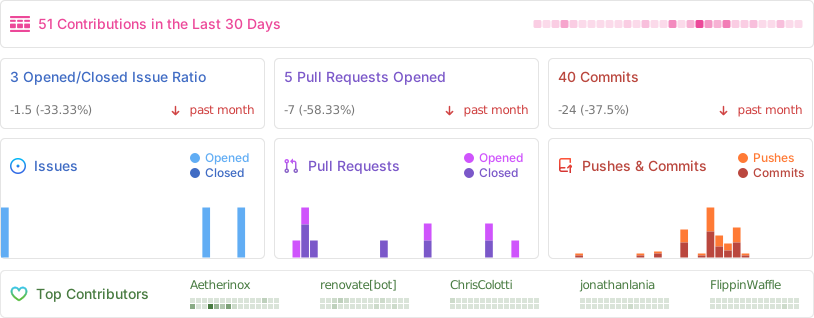
## ✨ Contributors
|
|
We are always looking for contributors. If you feel that you can provide something useful to Gistr, then we'd love to review your suggestion. Before submitting your contribution, please review the following resources:
|
|
|
|
- [Pull Request Procedure](.github/PULL_REQUEST_TEMPLATE.md)
|
|
- [Contributor Policy](CONTRIBUTING.md)
|
|
|
|
<br />
|
|
|
|
Want to help but can't write code?
|
|
- Review [active questions by our community](https://github.com/TheBinaryNinja/tvapp2/labels/help%20wanted) and answer the ones you know.
|
|
|
|
<br />
|
|
|
|
|
|
|
|
<br />
|
|
|
|
The following people have helped get this project going:
|
|
|
|
<br />
|
|
|
|
<div align="center">
|
|
|
|
<!-- ALL-CONTRIBUTORS-BADGE:START - Do not remove or modify this section -->
|
|
[![Contributors][contribs-all-img]](#contributors-)
|
|
<!-- ALL-CONTRIBUTORS-BADGE:END -->
|
|
|
|
<!-- ALL-CONTRIBUTORS-LIST:START - Do not remove or modify this section -->
|
|
<!-- prettier-ignore-start -->
|
|
<!-- markdownlint-disable -->
|
|
<table>
|
|
<tbody>
|
|
<tr>
|
|
<td align="center" valign="top"><a href="https://github.com/Aetherinox">
|
|
<img src="https://avatars.githubusercontent.com/u/118329232?v=4?s=40" width="80px;" alt="Aetherinox"/><br /><sub><b>Aetherinox</b></sub></a><br /><a href="https://github.com/TheBinaryNinja/tvapp2/commits?author=Aetherinox" title="Code">💻</a>
|
|
</td>
|
|
<td align="center" valign="top"><a href="https://github.com/iFlip721">
|
|
<img src="https://avatars.githubusercontent.com/u/28721588?v=4" width="80px;" alt="iFlip721"/><br /><sub><b>iFlip721</b></sub></a><br /><a href="https://github.com/TheBinaryNinja/tvapp2/commits?author=iFlip721" title="Code">💻</a>
|
|
</td>
|
|
<td align="center" valign="top"><a href="https://github.com/Nvmdfth">
|
|
<img src="https://avatars.githubusercontent.com/u/32874812?v=4" width="80px;" alt="Nvmdfth"/><br /><sub><b>Optx</b></sub></a><br /><a href="https://github.com/TheBinaryNinja/tvapp2/commits?author=Nvmdfth" title="Code">💻</a>
|
|
</td>
|
|
</tr>
|
|
</tbody>
|
|
</table>
|
|
</div>
|
|
<!-- markdownlint-restore -->
|
|
<!-- prettier-ignore-end -->
|
|
<!-- ALL-CONTRIBUTORS-LIST:END -->
|
|
|
|
<br />
|
|
<br />
|
|
|
|
<!-- BADGE > GENERAL -->
|
|
[general-npmjs-uri]: https://npmjs.com
|
|
[general-nodejs-uri]: https://nodejs.org
|
|
[general-npmtrends-uri]: http://npmtrends.com/csf-firewall
|
|
|
|
<!-- BADGE > VERSION > GITHUB -->
|
|
[github-version-img]: https://img.shields.io/github/v/tag/TheBinaryNinja/tvapp2?logo=GitHub&label=Version&color=ba5225
|
|
[github-version-uri]: https://github.com/TheBinaryNinja/tvapp2/releases
|
|
|
|
<!-- BADGE > LICENSE > MIT -->
|
|
[license-mit-img]: https://img.shields.io/badge/MIT-FFF?logo=creativecommons&logoColor=FFFFFF&label=License&color=9d29a0
|
|
[license-mit-uri]: https://github.com/TheBinaryNinja/tvapp2/blob/main/LICENSE
|
|
|
|
<!-- BADGE > GITHUB > DOWNLOAD COUNT -->
|
|
[github-downloads-img]: https://img.shields.io/github/downloads/TheBinaryNinja/tvapp2/total?logo=github&logoColor=FFFFFF&label=Downloads&color=376892
|
|
[github-downloads-uri]: https://github.com/TheBinaryNinja/tvapp2/releases
|
|
|
|
<!-- BADGE > GITHUB > DOWNLOAD SIZE -->
|
|
[github-size-img]: https://img.shields.io/github/repo-size/TheBinaryNinja/tvapp2?logo=github&label=Size&color=59702a
|
|
[github-size-uri]: https://github.com/TheBinaryNinja/tvapp2/releases
|
|
|
|
<!-- BADGE > ALL CONTRIBUTORS -->
|
|
[contribs-all-img]: https://img.shields.io/github/all-contributors/TheBinaryNinja/tvapp2?logo=contributorcovenant&color=de1f6f&label=contributors
|
|
[contribs-all-uri]: https://github.com/all-contributors/all-contributors
|
|
|
|
<!-- BADGE > GITHUB > BUILD > NPM -->
|
|
[github-build-img]: https://img.shields.io/github/actions/workflow/status/TheBinaryNinja/tvapp2/npm-release.yml?logo=github&logoColor=FFFFFF&label=Build&color=%23278b30
|
|
[github-build-uri]: https://github.com/TheBinaryNinja/tvapp2/actions/workflows/npm-release.yml
|
|
|
|
<!-- BADGE > GITHUB > BUILD > Pypi -->
|
|
[github-build-pypi-img]: https://img.shields.io/github/actions/workflow/status/TheBinaryNinja/tvapp2/release-pypi.yml?logo=github&logoColor=FFFFFF&label=Build&color=%23278b30
|
|
[github-build-pypi-uri]: https://github.com/TheBinaryNinja/tvapp2/actions/workflows/pypi-release.yml
|
|
|
|
<!-- BADGE > GITHUB > TESTS -->
|
|
[github-tests-img]: https://img.shields.io/github/actions/workflow/status/TheBinaryNinja/tvapp2/npm-tests.yml?logo=github&label=Tests&color=2c6488
|
|
[github-tests-uri]: https://github.com/TheBinaryNinja/tvapp2/actions/workflows/npm-tests.yml
|
|
|
|
<!-- BADGE > GITHUB > COMMIT -->
|
|
[github-commit-img]: https://img.shields.io/github/last-commit/TheBinaryNinja/tvapp2?logo=conventionalcommits&logoColor=FFFFFF&label=Last%20Commit&color=313131
|
|
[github-commit-uri]: https://github.com/TheBinaryNinja/tvapp2/commits/main/
|
|
|
|
<!-- BADGE > Github > Docker Image > SELFHOSTED BADGES -->
|
|
[github-docker-version-img]: https://badges-ghcr.onrender.com/thebinaryninja/tvapp2/latest_tag?color=%233d9e18&ignore=latest&label=version&trim=
|
|
[github-docker-version-uri]: https://github.com/TheBinaryNinja/tvapp2/pkgs/container/tvapp2
|
|
|
|
<!-- BADGE > Dockerhub > Docker Image -->
|
|
[dockerhub-docker-version-img]: https://img.shields.io/docker/v/thebinaryninja/tvapp2
|
|
[dockerhub-docker-version-uri]: https://hub.docker.com/repository/docker/thebinaryninja/tvapp2/general
|
|
|
|
<!-- BADGE > Gitea > Docker Image > SELFHOSTED BADGES -->
|
|
[gitea-docker-version-img]: https://badges-ghcr.onrender.com/thebinaryninja/tvapp2/latest_tag?color=%23f21171&ignore=latest&label=version&trim=
|
|
[gitea-docker-version-uri]: https://git.binaryninja.net/BinaryNinja/tvapp2
|
|
|
|
<!-- BADGE > Gitea 2 > Docker Image -->
|
|
[gitea2-docker-version-img]: https://img.shields.io/gitea/v/release/binaryninja/tvapp2?gitea_url=https%3A%2F%2Fgit.binaryninja.net
|
|
[gitea2-docker-version-uri]: https://git.binaryninja.net/BinaryNinja/-/packages/container/tvapp2/latest
|