Automatic m3u8 / xml grabber for TheTvApp
♾️ TheTvApp Automated Grabber ♾️
Docker image which automatically fetches the M3U playlist and EPG (XML) guide data for TheTvApp. Can be loaded into IPTV applications such as Jellyfin.
Makes use of the generous work over at [https://github.com/dtankdempse/thetvapp-m3u](https://github.com/dtankdempse/thetvapp-m3u)
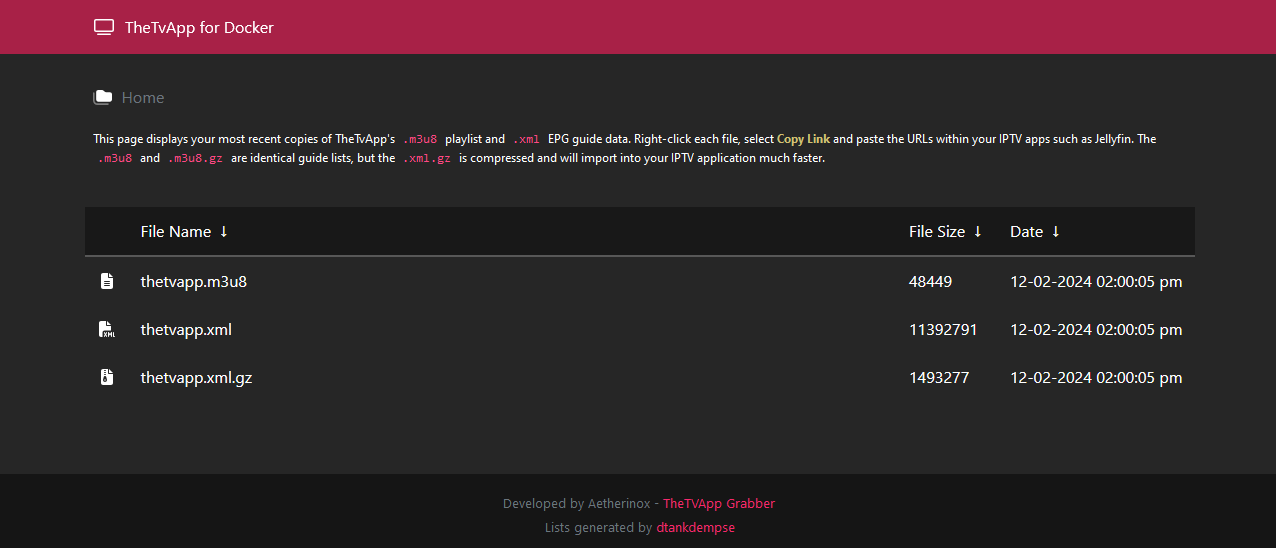
> [!NOTE]
> Currently, the files are not updated with the latest tokens. The developer [https://github.com/dtankdempse/](https://github.com/dtankdempse/) is currently migrating to an alternative solution.
> Stay tuned.
[![Version][github-version-img]][github-version-uri]
[![Docker Version][dockerhub-version-img]][dockerhub-version-uri]
[![Downloads][github-downloads-img]][github-downloads-uri]
[![Docker Pulls][dockerhub-pulls-img]][dockerhub-pulls-uri]
[![Build Status][github-build-img]][github-build-uri]
[![Size][github-size-img]][github-size-img]
[![Last Commit][github-commit-img]][github-commit-img]
[![Contributors][contribs-all-img]](#contributors-)
---
- [About](#about)
- [Docker Images](#docker-images)
- [Docker Tags](#docker-tags)
- [Install](#install)
- [Docker Run](#docker-run)
- [Docker Compose](#docker-compose)
- [Traefik](#traefik)
- [Dynamic.yml](#dynamicyml)
- [Static.yml](#staticyml)
- [certificatesResolvers](#certificatesresolvers)
- [entryPoints (Normal)](#entrypoints-normal)
- [entryPoints (Cloudflare)](#entrypoints-cloudflare)
- [Env Variables \& Volumes](#env-variables--volumes)
- [Environment Variables](#environment-variables)
- [Volumes](#volumes)
- [Build](#build)
- [Troubleshooting](#troubleshooting)
- [Permission Denied](#permission-denied)
- [Shell / Bash](#shell--bash)
- [SSL Certificates](#ssl-certificates)
- [Logs](#logs)
- [Contributors ✨](#contributors-)
---
## About
This container allows you to automatically fetch the latest `.m3u8` playlist, and `.xml` guide files for the TheTvApp IPTV service.
Once the container is started up, an initial grab will be done immediately. After that initial grab, the container will periodically grab new copies of the files every X hours, which can be adjusted by modifying the docker environment variables.
The fetched .m3u8 and .xml files are then placed in a self-hosted nginx webserver which allows you to add the direct links directly into applications such as Jellyfin without having to go back and update the files on your own.
Container supports the following:
- Automatically grabs .m3u8 and .xml files when container started up
- Every 60 minutes, a new copy of the .m3u8 and .xml files will be fetched
- Supports both ports `80` and `443`
- Self-signed SSL certificates (optional)
- Mountable volume to control Nginx webserver files
- Customizable URLs via env var should the m3u8 and xml links change
- Integrated nginx hosted file browser for viewing all downloaded files, along with date and file size
---
## Docker Images
Use any of the following images in your `docker-compose.yml` or `run` command:
| Service | Version | Image Link |
| --- | --- | --- |
| `Docker Hub` | [![Docker Version][dockerhub-version-ftb-img]][dockerhub-version-ftb-uri] | `aetherinox/thetvapp:latest` |
| `Github` | [![Github Version][github-version-ftb-img]][github-version-ftb-uri] | `ghcr.io/aetherinox/thetvapp-docker:latest` |
---
## Docker Tags
This repo includes a few different versions of the TheAppTV docker image.
We release two versions, one docker image with just Nginx, and one with Nginx and PHP. The version that includes PHP is completely optional, and is only needed if you wish to develop your own enhancements for this image.
The image that comes with Nginx and PHP is slightly larger (roughly `20MB` + more).
| Tag | Includes Nginx | Includes PHP 8 | Description |
| --- | --- | --- | --- |
| `:latest` | ✅ | ❌ | Latest version of the image |
| `:1.x.x` | ✅ | ❌ | Pull a specific version |
| `:1.x.x-php` | ✅ | ✅ | Contains both Nginx and PHP; larger image size |
---
## Install
Instructions on using this container
### Docker Run
If you want to bring the docker container up quickly, use the following command:
```shell
docker run -d --restart=unless-stopped -e CRON_TIME=*/60 * * * * -p 443:443 --name thetvapp -v ${PWD}/thetvapp:/config ghcr.io/aetherinox/thetvapp-docker:latest
```
### Docker Compose
Create a new `docker-compose.yml` with the following:
```yml
services:
thetvapp:
container_name: thetvapp
image: ghcr.io/aetherinox/thetvapp-docker:latest # Github image
# image: aetherinox/thetvapp:latest # Dockerhub image
restart: unless-stopped
volumes:
- ./thetvapp:/config
environment:
- PUID=1000
- PGID=1000
- TZ=Etc/UTC
- CRON_TIME=*/60 * * * *
```
> [!CAUTION]
> Do **not** add `"` quotation marks to `CRON_TIME` environment variable. Automated timer will not function if you do.
>
> ✔️ Correct
> ```yml
> environment:
> - CRON_TIME=*/60 * * * *
> ```
>
> ❌ Incorrect
> ```yml
> environment:
> - CRON_TIME="*/60 * * * *"
> ```
### Traefik
You can put this container behind Traefik if you want to use a reverse proxy and let Traefik handle the SSL certificate.
> [!NOTE]
> These steps are **optional**.
>
> If you do not use Traefik, you can skip this section of steps. This is only for users who wish to put this container behind Traefik.
#### Dynamic.yml
Open the Traefik dynamic file which is usually named `dynamic.yml`. We need to add a new `middleware`, `router`, and `service` to our Traefik dynamic file so that it knows about our new TheTVApp container and where it is.
```yml
http:
middlewares:
https-redirect:
redirectScheme:
scheme: "https"
permanent: true
routers:
thetvapp-http:
service: thetvapp
rule: Host(`domain.localhost`) || Host(`thetvapp.domain.com`)
entryPoints:
- http
middlewares:
- https-redirect@file
thetvapp-https:
service: thetvapp
rule: Host(`domain.localhost`) || Host(`thetvapp.domain.com`)
entryPoints:
- https
tls:
certResolver: cloudflare
domains:
- main: "domain.com"
sans:
- "*.domain.com"
services:
thetvapp:
loadBalancer:
servers:
- url: "https://thetvapp:443"
```
#### Static.yml
These entries will go in your Traefik `static.yml` file. Any changes made to this file requires that you reset Traefik afterward.
##### certificatesResolvers
Open your Traefik `static.yml` file and add your `certResolver` from above. We are going to use Cloudflare in this exmaple, you can use whatever from the list at:
- https://doc.traefik.io/traefik/https/acme/#providers
```yml
certificatesResolvers:
cloudflare:
acme:
email: youremail@address.com
storage: /cloudflare/acme.json
keyType: EC256
preferredChain: 'ISRG Root X1'
dnsChallenge:
provider: cloudflare
delayBeforeCheck: 15
resolvers:
- "1.1.1.1:53"
- "1.0.0.1:53"
disablePropagationCheck: true
```
Once you pick the DNS / SSL provider you want to use from the code above, you need to see if that provider has any special environment variables that must be set. The [Providers Page](https://doc.traefik.io/traefik/https/acme/#providers) lists all providers and also what env variables need set for each one.
In our example, since we are using Cloudflare for `dnsChallenge` -> `provider`, we must set:
- `CF_API_EMAIL`
- `CF_API_KEY`
Create a `.env` environment file in the same folder where your Traefik `docker-compose.yml` file is located, and add the following:
```yml
CF_API_EMAIL=yourcloudflare@email.com
CF_API_KEY=Your-Cloudflare-API-Key
```
Save the `.env` file and exit.
##### entryPoints (Normal)
Finally, inside the Traefik `static.yml`, we need to make sure we have our `entryPoints` configured. Add the following to the Traefik `static.yml` file only if you **DON'T** have entry points set yet:
```yml
entryPoints:
http:
address: :80
http:
redirections:
entryPoint:
to: https
scheme: https
https:
address: :443
http3: {}
http:
tls:
options: default
certResolver: cloudflare
domains:
- main: domain.com
sans:
- '*.domain.com'
```
##### entryPoints (Cloudflare)
If your website is behind Cloudflare's proxy service, you need to modify your `entryPoints` above so that you can automatically allow Cloudflare's IP addresses through. This means your entry points will look a bit different.
In the example below, we will add `forwardedHeaders` -> `trustedIPs` and add all of Cloudflare's IPs to the list which are available here:
- https://www.cloudflare.com/ips/
```yml
http:
address: :80
forwardedHeaders:
trustedIPs: &trustedIps
- 103.21.244.0/22
- 103.22.200.0/22
- 103.31.4.0/22
- 104.16.0.0/13
- 104.24.0.0/14
- 108.162.192.0/18
- 131.0.72.0/22
- 141.101.64.0/18
- 162.158.0.0/15
- 172.64.0.0/13
- 173.245.48.0/20
- 188.114.96.0/20
- 190.93.240.0/20
- 197.234.240.0/22
- 198.41.128.0/17
- 2400:cb00::/32
- 2606:4700::/32
- 2803:f800::/32
- 2405:b500::/32
- 2405:8100::/32
- 2a06:98c0::/29
- 2c0f:f248::/32
http:
redirections:
entryPoint:
to: https
scheme: https
https:
address: :443
http3: {}
forwardedHeaders:
trustedIPs: *trustedIps
http:
tls:
options: default
certResolver: cloudflare
domains:
- main: domain.com
sans:
- '*.domain.com'
```
Save the files and then give Traefik and your TheTvApp containers a restart.
---
## Env Variables & Volumes
This section outlines that environment variables can be specified, and which volumes you can mount when the container is started.
### Environment Variables
The following env variables can be modified before spinning up this container:
| Env Var | Default | Description |
| --- | --- | --- |
| `PUID` | 1000 | User ID running the container |
| `PGID` | 1000 | Group ID running the container |
| `TZ` | Etc/UTC | Timezone |
| `PORT_HTTP` | 80 | Defines the HTTP port to run on |
| `PORT_HTTPS` | 443 | Defines the HTTPS port to run on |
| `CRON_TIME` | 0/60 * * * * | Determines how often the .m3u8 and .xml guide files are updated |
| `URL_XML` | https://raw.githubusercontent.com/dtankdempse/thetvapp-m3u/refs/heads/main/guide/epg.xml | URL to fetch `.xml` file |
| `URL_XML_GZ` | https://raw.githubusercontent.com/dtankdempse/thetvapp-m3u/refs/heads/main/guide/epg.xml.gz | URL to fetch `.xml.gz` file |
| `URL_M3U` | https://thetvapp-m3u.data-search.workers.dev/playlist | URL to fetch `.m3u8` file |
Please note that you can change the URLs for the files fetched from the internet, but it is highly advised to not do this unless you know for sure that the location paths have changed. To change the URLs to the `m3u8`, `.xml`, and `.xml.gz`; change the following environment variables:
- `URL_XML=https://url/to/file.xml`
- `URL_XML_GZ=https://url/to/file.xml.gz`
- `URL_M3U=https://url/to/file.m3u8`
### Volumes
The following volumes can be mounted with this container:
| Volume | Description |
| --- | --- |
| `./thetvapp:/config` | Path which stores downloaded `.m3u8`, `.xml`, nginx configs, and optional SSL certificate/keys |
By mounting the volume above, you should now have access to the following folders:
| Folder | Description |
| --- | --- |
| `📁 keys` | Responsible for storing your ssl certificate `cert.crt` + key `cert.key` |
| `📁 log` | All nginx and php logs |
| `📁 nginx` | Contains `nginx.conf`, `resolver.conf`, `ssl.conf`, `site-confs` |
| `📁 php` | Contains `php-local.ini`, `www2.conf` |
| `📁 www` | Folder where downloaded `.m3u8`, `.xml`, and `.xml.gz` will be downloaded to |
---
## Build
You can build your own copy of the image by running the following:
```shell
git clone https://github.com/Aetherinox/thetvapp-docker.git .
docker build -t thetvapp:latest thetvapp:1.0.0 .
```
### Troubleshooting
These are issues you may experience when building and deploying your own custom image.
#### Permission Denied
```console
Failed to open apk database: Permission denied
unable to exec /etc/s6-overlay/s6-rc.d/init-envfile/run: Permission denied
unable to exec /etc/s6-overlay/s6-rc.d/init-envfile/run: Permission denied
```
If you receive any type of `permission denied` error when running your custom image, you must ensure that certain files have executable `+x` (or `0755`) permissions. Once you fix the file permissions, re-build the image. A full list of files requiring elevated permissions are listed below:
```shell
sudo chmod +x /root/etc/s6-overlay/s6-rc.d/init-adduser/run
sudo chmod +x /root/etc/s6-overlay/s6-rc.d/init-crontab-config/run
sudo chmod +x /root/etc/s6-overlay/s6-rc.d/init-custom-files/run
sudo chmod +x /root/etc/s6-overlay/s6-rc.d/init-envfile/run
sudo chmod +x /root/etc/s6-overlay/s6-rc.d/init-folders/run
sudo chmod +x /root/etc/s6-overlay/s6-rc.d/init-keygen/run
sudo chmod +x /root/etc/s6-overlay/s6-rc.d/init-migrations/run
sudo chmod +x /root/etc/s6-overlay/s6-rc.d/init-nginx/run
sudo chmod +x /root/etc/s6-overlay/s6-rc.d/init-permissions/run
sudo chmod +x /root/etc/s6-overlay/s6-rc.d/init-php/run
sudo chmod +x /root/etc/s6-overlay/s6-rc.d/init-samples/run
sudo chmod +x /root/etc/s6-overlay/s6-rc.d/init-version-checks/run
sudo chmod +x /root/etc/s6-overlay/s6-rc.d/svc-cron/run
sudo chmod +x /root/etc/s6-overlay/s6-rc.d/svc-nginx/run
sudo chmod +x /root/etc/s6-overlay/s6-rc.d/svc-php-fpm/run
sudo chmod +x /run.sh
sudo chmod +x /download.sh
```
---
## Shell / Bash
You can access the docker container's shell by running:
```shell
docker exec -it thetvapp ash
```
---
## SSL Certificates
This docker image automatically generates an SSL certificate when the nginx server is brought online.
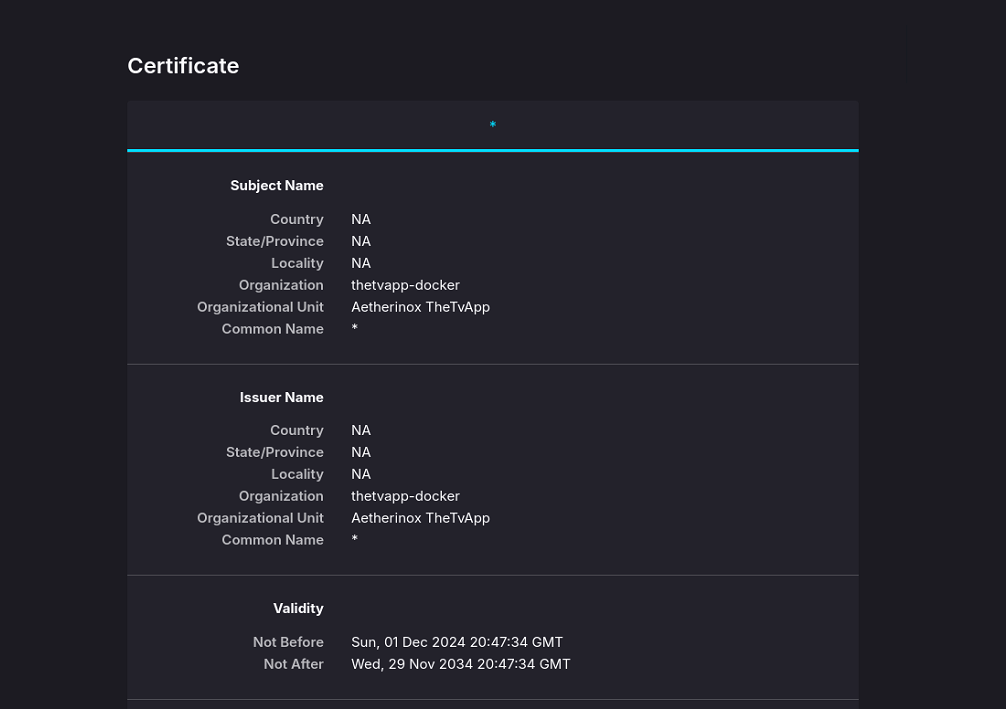
You may opt to either use the generated self-signed certificate, or you can add your own. If you decide to use your own self-signed certificate, ensure you have mounted the `/config` volume in your `docker-compose.yml`:
```yml
services:
thetvapp:
container_name: thetvapp
image: ghcr.io/aetherinox/thetvapp-docker:latest # Github image
restart: unless-stopped
volumes:
- ./thetvapp:/config
```
Then navigate to the newly mounted folder and add your `📄 cert.crt` and `🔑 cert.key` files to the `📁 /thetvapp/keys/*` folder.
> [!NOTE]
> If you are generating your own certificate and key, we recommend a minimum of:
> - RSA: `2048 bits`
> - ECC: `256 bits`
> - ECDSA: `P-384 or P-521`
---
## Logs
This image spits out detailed information about its current progress. You can either use `docker logs` or a 3rd party app such as [Portainer](https://portainer.io/) to view the logs.
```shell
───────────────────────────────────────────────────────────────
TheTvApp Docker Container
───────────────────────────────────────────────────────────────
This container automatically downloads the m3u8 and xml guide
data from
- https://github.com/dtankdempse/thetvapp-m3u
Once the data is downloaded, you can access the files from
the container's webserver.
User ID ........... 1000
Group ID .......... 1000
Port HTTP ......... 80
Port HTTPS ........ 443
───────────────────────────────────────────────────────────────
SSL : Using existing keys found in /config/keys
Loader : No custom files found, skipping...
Core : Completed loading container
Config : Setting task to run */60 * * * *
Setting timezone Etc/UTC
Start : Downloading latest thetvapp m3u + xml
Getting thetvapp.xml › https://raw.githubusercontent.com/dtankdempse/thetvapp-m3u/refs/heads/main/guide/epg.xml
Getting thetvapp.xml.gz › https://raw.githubusercontent.com/dtankdempse/thetvapp-m3u/refs/heads/main/guide/epg.xml.gz
Getting thetvapp.m3u8 › https://thetvapp-m3u.data-search.workers.dev/playlist
End : Finished update at 12-01-2024 15:00:00
```
---
## Contributors ✨
We are always looking for contributors. If you feel that you can provide something useful to Gistr, then we'd love to review your suggestion. Before submitting your contribution, please review the following resources:
- [Pull Request Procedure](.github/PULL_REQUEST_TEMPLATE.md)
- [Contributor Policy](CONTRIBUTING.md)
Want to help but can't write code?
- Review [active questions by our community](https://github.com/Aetherinox/thetvapp-docker/labels/help%20wanted) and answer the ones you know.
The following people have helped get this project going:
[![Contributors][contribs-all-img]](#contributors-)
[general-npmjs-uri]: https://npmjs.com
[general-nodejs-uri]: https://nodejs.org
[general-npmtrends-uri]: http://npmtrends.com/thetvapp-docker
[github-version-img]: https://img.shields.io/github/v/tag/Aetherinox/thetvapp-docker?logo=GitHub&label=Version&color=ba5225
[github-version-uri]: https://github.com/Aetherinox/thetvapp-docker/releases
[github-version-ftb-img]: https://img.shields.io/github/v/tag/Aetherinox/thetvapp-docker?style=for-the-badge&logo=github&logoColor=FFFFFF&logoSize=34&label=%20&color=ba5225
[github-version-ftb-uri]: https://github.com/Aetherinox/thetvapp-docker/releases
[npm-version-img]: https://img.shields.io/npm/v/thetvapp-docker?logo=npm&label=Version&color=ba5225
[npm-version-uri]: https://npmjs.com/package/thetvapp-docker
[pypi-version-img]: https://img.shields.io/pypi/v/thetvapp-docker-plugin
[pypi-version-uri]: https://pypi.org/project/thetvapp-docker-plugin/
[license-mit-img]: https://img.shields.io/badge/MIT-FFF?logo=creativecommons&logoColor=FFFFFF&label=License&color=9d29a0
[license-mit-uri]: https://github.com/Aetherinox/thetvapp-docker/blob/main/LICENSE
[github-downloads-img]: https://img.shields.io/github/downloads/Aetherinox/thetvapp-docker/total?logo=github&logoColor=FFFFFF&label=Downloads&color=376892
[github-downloads-uri]: https://github.com/Aetherinox/thetvapp-docker/releases
[npmjs-downloads-img]: https://img.shields.io/npm/dw/%40aetherinox%2Fcsf-firewall?logo=npm&&label=Downloads&color=376892
[npmjs-downloads-uri]: https://npmjs.com/package/thetvapp-docker
[github-size-img]: https://img.shields.io/github/repo-size/Aetherinox/thetvapp-docker?logo=github&label=Size&color=59702a
[github-size-uri]: https://github.com/Aetherinox/thetvapp-docker/releases
[npmjs-size-img]: https://img.shields.io/npm/unpacked-size/thetvapp-docker/latest?logo=npm&label=Size&color=59702a
[npmjs-size-uri]: https://npmjs.com/package/thetvapp-docker
[codecov-coverage-img]: https://img.shields.io/codecov/c/github/Aetherinox/thetvapp-docker?token=MPAVASGIOG&logo=codecov&logoColor=FFFFFF&label=Coverage&color=354b9e
[codecov-coverage-uri]: https://codecov.io/github/Aetherinox/thetvapp-docker
[contribs-all-img]: https://img.shields.io/github/all-contributors/Aetherinox/thetvapp-docker?logo=contributorcovenant&color=de1f6f&label=contributors
[contribs-all-uri]: https://github.com/all-contributors/all-contributors
[github-build-img]: https://img.shields.io/github/actions/workflow/status/Aetherinox/thetvapp-docker/deploy-docker.yml?logo=github&logoColor=FFFFFF&label=Build&color=%23278b30
[github-build-uri]: https://github.com/Aetherinox/thetvapp-docker/actions/workflows/deploy-docker.yml
[github-build-pypi-img]: https://img.shields.io/github/actions/workflow/status/Aetherinox/thetvapp-docker/release-pypi.yml?logo=github&logoColor=FFFFFF&label=Build&color=%23278b30
[github-build-pypi-uri]: https://github.com/Aetherinox/thetvapp-docker/actions/workflows/pypi-release.yml
[github-tests-img]: https://img.shields.io/github/actions/workflow/status/Aetherinox/thetvapp-docker/npm-tests.yml?logo=github&label=Tests&color=2c6488
[github-tests-uri]: https://github.com/Aetherinox/thetvapp-docker/actions/workflows/npm-tests.yml
[github-commit-img]: https://img.shields.io/github/last-commit/Aetherinox/thetvapp-docker?logo=conventionalcommits&logoColor=FFFFFF&label=Last%20Commit&color=313131
[github-commit-uri]: https://github.com/Aetherinox/thetvapp-docker/commits/main/
[dockerhub-version-img]: https://img.shields.io/docker/v/aetherinox/thetvapp/latest?logo=docker&logoColor=FFFFFF&label=Docker%20Version&color=ba5225
[dockerhub-version-uri]: https://hub.docker.com/repository/docker/aetherinox/thetvapp/general
[dockerhub-version-ftb-img]: https://img.shields.io/docker/v/aetherinox/thetvapp/latest?style=for-the-badge&logo=docker&logoColor=FFFFFF&logoSize=34&label=%20&color=ba5225
[dockerhub-version-ftb-uri]: https://hub.docker.com/repository/docker/aetherinox/thetvapp/tags
[dockerhub-pulls-img]: https://img.shields.io/docker/pulls/aetherinox/thetvapp?logo=docker&logoColor=FFFFFF&label=Docker%20Pulls&color=af9a00
[dockerhub-pulls-uri]: https://hub.docker.com/repository/docker/aetherinox/thetvapp/general

